 |
||||||||||||||||||||||||||||||||||||||||||||||||||||||||||||||||||||||||||||||||||||||||||||||||||||||||||||||||||||||||||||||||||||||||||||||||||||||||||||||||||||||||||||||||||||||||||||||||||||
| Home Getting Started Download Documentation API Docs Reference FAQ EJB 3.0 Support Contact Viewpoint |
Hydrate PrimerIntroductionHydrate concerns itself with object data models and the process of populating those data models from various relational and hierarchical data sources, of saving those data models back to a relational database and of mapping the same schema to one or more XML representations. Basic Usage - The Hello World ApplicationSince time immemorial, the humble 'Hello World' application has been used to demonstrate the simplest possible program in a programming language or application framework. The Hello World for the java programming language is the iconic:
But what if you want to be able to support a greeting that changes depending on the current locale? Assuming we have a database with a table listing a range of greetings by language that we want to read so that the greeting changes. Suppose we have been given a database table listing greetings from different countries as follows:
Note the clause 'we have been given'. It is the case more often than not in database design and integration that we have to work with existing data using a database schema that we may not have chosen ourselves. In this case, we might like to have more information about the country (a name for example), but we work with what we have. We should like to have this information represented through an object view consisting of two objects, a country and a greeting, with a one-to-many relationship between them. We write down a UML-style class diagram showing the relationship between country and greeting: In Hydrate we use the toolset to generate two java bean
classes:
Country and Greeting that represent the above UML diagram (more on
this later). We can then write in place of the
Let's look at what is happening here. Line 2: The call to set up establishes a few services that will be needed to read data from the database and manage the hydrate context. The code has factored out of this listing as it is standard boilerplate code and adds little to the understanding of what Hydrate is doing. Lines 4-5: We create a prepared statement using JDBC. There is nothing special to Hydrate about this prepared statement - it is created using unadulterated java.sql classes. In fact, any prepared statement can be run and mapped to the objects that are in the object model. The names of the columns returned have been carefully chosen to match the names of the attributes of the 'Greeting' object. One of these attributes is actually a reference to the country object and the full name 'country_code' includes the name of the primary key of that object. This simple mapping will create greeting and country objects, automatically linking one to the other and eliminating duplicate country objects. Lines 6-8: We use the helper class QueryRunner, to actually execute the prepared statement that has been created. We add an 'Assembler' object to the query runner before telling it to run the query. The assembler in question is a 'GreetingAssembler', which tells hydrate that it should be creating and resolving 'Greeting' objects from this query. The build method runs the query and adds any objects found to the hydrate context. After calling 'build' at line 8, the Hydrate framework will have run the query, built all the objects it can find from it, and stored them in the JVM's memory. In this case, it will have created five country objects: US, UK, FR, ES and AU, and linked each to a list of greetings: two greetings each in the case of US and UK and one each for the other countries. Lines 10-11: we use a key to look up the 'Country' object for the default locale in the hydrate context. We do this by creating an instance of a key object (the class for which has been generated) with the country code taken from the default locale as a parameter. This key can be resolved directly to a country object assuming one has been loaded. This call looks only among the objects that have been loaded into memory by the previous query, it will never go out to the database itself. Lines 13-16: Iterate through the greetings belonging to the default country and print each one to System.out. Summary
UML and class diagramsThere is much polemic about the best form for describing an object data model: Java POJOs, Entity relationship diagrams, relational models and XML all have their strengths and weaknesses. The Hydrate framework opts to use a limited version of the class diagram as defined in Unified Modelling Language (UML) as a starting point for its data modelling. From this, with one or two additional pieces of information, everything else flows through static code generation:
For the applications in which Hydrate excels, the quantity of handwritten code required is less than would be needed using POJOs, the code generation step is fast and has been streamlined through ant, and yet you retain great flexibility in how objects are populated with data, written to the database and generally manipulated. Here is an example of a Hydrate definition file that defines two classes:
To generate the sample files run the ant build script in the HydrateSample directory. The code generation process, creates a rather bewildering array of classes and interfaces, but for now it is worth concentrating on the java bean interfaces that have been created. For each object in the model, Hydrate writes a bean interface, that is, a Java interface with the same name as the object it represents, that declares getter and setter methods for each of the attributes in your model. The types of each of the attributes matches the declared type, but note that native types are used where possible for performance and storage efficiency. You'll see that references to other objects return references to the appropriate object class, so each Greeting object has one and only one Country in the model, so the greeting has a getter/setter pair for setting the country with a Country reference. Meanwhile, the Country object which has a reference to a list of Greetings, has a getter/setter pair for a collection of Greetings. For the above model, two interfaces are created, one for the Country and one for the Greeting. The Country has getters and setters for its declared attributes:
as well as a method for getting and setting the collection of Greetings:
The Greeting object has similar getters and setters and a method for setting the country reference:
This is pretty uncontroversial stuff. If you are writing bean objects that are principally designed to store and provide access to data, there are not really many choices to make at the interface level. The Hydrate definition file is actually a pretty succinct way to represent this information and keep it up to date, so ceding control over the actual coding of your POJOs, or at least the interfaces that front them, is starting to pay dividends. The interface also declares any other methods that you have declared in your model. These methods can be declared in the object definition file to have any specification, and this allows you to have your object support other interfaces that you have defined elsewhere to integrate better into your application. You will also see that the object interfaces have an inner-interface called Init. This is used by the framework to distinguish between objects being set by the framework and being set by application code so that the framework in turn can mark them as dirty and ensure that two way relationships are maintained between objects if required. Summary
Visualization toolHydrate comes with a UML visualization tool to help understand
the
structure of your declared object model. Simply start the tool and
open the object model you have defined. For example, here is the
display for the above object model. You get this by typing the following at the (linux) command
prompt from the HydrateSample directory:
or for Windows:
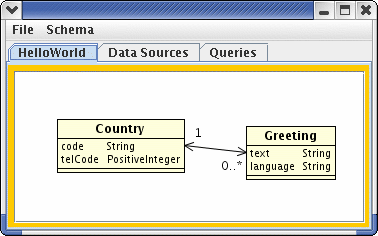 The tool also provides support for writing more complex mapping queries. There is more on this in chapter on the Query Map Builder Summary
Object Context, Request Context: Caches and Units of WorkBefore using Hydrate objects, a few preparatory steps are necessary to set up an environment into which bean objects are placed and managed. An ObjectContext can be thought of as a bucket into which objects managed by Hydrate are placed when created or read from the database. As such the ObjectContext provides methods to find objects by their keys and to iterate through collections of objects. The context is also the place which determines the factory that will be used by default to build each type of object and the queries that are used by default to read and write the objects from the database. Finally it provides a central point in which the modification state of the objects is held and a method 'saveAll' that allows all objects to be updated in the database. An ObjectContext is often used to do one specific job that relates to a request for data or the amendment of a database. However, by leaving the ObjectContext in scope, you can use it as a cache for data over several operations. The RequestContext is responsible for managing resources that are used within the scope of a small unit of work such as servicing a request from a client. This object keeps track and caches queries that are used to read and write objects and connections that are needed for access to the databases. Before using Hydrate in any way that needs to implicitly use any of these database resources, a request context must be set up and provided with any connections that it needs to get its job done. By explicitly making the connections available we maintain maximum flexibility as to the source of the connections while avoiding deadlock conditions that can happen if more than one connection is needed to complete a request. You must remember to clean up the request context when completing each request. This is typically done in a finally block, so that the cleanup is guaranteed no matter what the execution path of the request. Typical usage pattern 1: simple standalone application. In a very simple standalone application which is performing a single function, you will probably want to set up the ObjectContext and a RequestContext at the point an application starts, then make them available to the rest of the application, perhaps even in the static scope.
Typical usage pattern 2: responding to server requests as a web application. In response to the request, set up and configure an ObjectContext, then a RequestContext, add all connections that will be used in the request to the RequestContext. Release connections in the RequestContext in a finally block after using Hydrate:
Typical Usage Pattern 3: The above usage pattern can be amended by saving the reference to the ObjectContext between request calls. In this way, the ObjectContext is effectively being used as a cache since objects referenced by it will stay in memory. If you choose to use the ObjectContext as a cache, then you are responsible for maintaining cache concurrency (i.e. ensuring that your in-memory objects are in sync with the database). Summary
Populating objects, partial population and 'not set' valuesHydrate works most effectively when used as a window on your database. You describe a model through the UML definition language that is designed to overlay your data model. You then use the Hydrate infrastructure to pull into memory cross- sections of this data that you need to provide an answer to a particular request. Suppose your database holds your entire inventory amounting to several Gb of information. You overlay an object model over this data and then to answer a particular request, you write a query or queries that will pull into in-memory objects, just those parts of the model that you need. For example, suppose you need to look for all widgets with a fire safety code of 'AAA' or better, that were delivered by ACME on a wet Wednesday last year. You can probably craft a query that can filter most of this information, but the 'wet Wednesday' clause could be tricky in SQL, particularly as weather information is not likely to be included in your stock database. You therefore write a query to pull back on each Wednesday last year. The query would include information about the supplier, the widget as well as other objects, but not all of the data for each object. You then perform the final validation check on the in-memory objects. You don't want to be forced to load all the attributes of the supplier, just to check that the supplier was in fact 'ACME', nor all details of the delivery schedule just to check that a delivery was on a Wednesday. In order to permit the partial population of data models, Hydrate supports the concept of 'not loaded' objects and attributes. An attribute or object reference that is tagged as 'not loaded' has simply not been read from the database (yet). Hydrate's ability to flag any attribute as 'not loaded' is a key feature of the architecture. It means that you can create fully legal representations of the object model in memory from a subset of the available data. Hydrate also supports the concept of 'Not Set' values, which and at this point, it is worth highlighting the difference between these and 'not loaded' values. An attribute or reference is marked as 'not set' if it has been read from the database, but semantically has no value in the data model. Your Widget object might have an attribute 'overseasReference', which is sometimes set where the widget has an alternate reference number, but is 'not set' in cases where it has not. This functionality is generally represented as a 'null' in a relational database. However, suppose you have populated your Widget object from the database using a query that does not request the 'overseasReference' field. That attribute would now be set to 'not loaded' - it may actually be 'not set' but we don't know 'cos we haven't read it from the database. Attributes can only be 'not set' if they are marked as 'optional' in the UML definition. This is a subtle but very important distinction and it is worth spending a couple of seconds considering the difference. So what happens when you try to access an attribute that is not loaded. The behaviour is actually implementation-specific, that is the implementation of the bean interface for each object can decide for itself how to handle this case. The recommended behaviour, and that taken by the default implementations of these interfaces, is to throw a 'NotLoadedException' as soon as any attempt is made to access a field that has not been loaded from the database. Accessing a field that is 'not set' elicits different behaviour. No exceptions are thrown, but a 'special' value is returned in each case. This return value can be tested with the equality operator '==' against a static 'not set' value that is generated as part of the each object bean interface. For example, for the overseasReference attribute in the Widget object, you can set the value to or test the returned value against: 'Widget.OVERSEASREFERENCE_NOTSET'. Summary
Mapping Queries - single objectThe simplest case of mapping from a relational database to an object model is where only one object type is being populated from the underlying data. This simple case is actually quite useful in refreshing or fully populating the attributes for a single data object. The example also illustrates the steps that must be followed when doing any data population. Mapping from a database query to an object is a three stage process:
When reading attributes of the key or attributes of the object itself, Hydrate looks for columns in the returned result set that have names that match the corresponding field in the object. You can use the standard SQL syntax to rename columns in the query as a way of ensuring that they match the attributes in your object, or you can use a map to convert the names returned from the query to attribute names of your object. The above three steps are repeated for each row returned in the query results set and in this way an object is created for each row in the returned query. If any of the keys in the returned results set was equal, the data from the rows where the keys are unique is assumed to refer to the same object and only one object is created by Hydrate. Let's look at a code snippet that demonstrates the above to populate a Country object from a hypothetical database with a table containing countries. Country has three attributes, code (the ISO code of the country), telCode (the international telephone dialling code for the country), and name (the name of the country). Country has a primary key consisting of the attribute 'code'. Here's the Java code:
The above code demonstrates the population of a single object 'Country' from a database table containing the ISO code and name of the country. The ISO code attribute in the database table needed to be renamed so that it matches the name of the object attribute 'code'. Note also that this query is not actually requesting the 'telCode' attribute (perhaps it is not available in this database). This code snippet will result in the creation of one Country object for each row in the returned results set with a unique isoCode value. So if the following rows are returned:
Four objects would be created of type Country, one for GB, US, ES and FR. The second US row from the result set would not give rise to the creation of a new object, because the key matches an existing object. The telCode field of each of the created objects would be set to 'NotLoaded'. Any attempt to access this field would result in an exception being thrown, but the object is otherwise fully valid. We now might run the following code snippet:
This might return the following rows:
We would now have a total of five objects in the context, all countries with codes 'GB', 'US', 'ES', 'FR' and 'IT'. The first two have both name and telCode loaded with their correct values. The second two have name loaded, but telCode is not loaded (and would throw an exception if accessed). The last object's name attribute is not loaded, but the telCode attribute is available. This example shows how you can use Hydrate to pull different pieces of information about the same object from different queries, and different data sources. This example is realistic in this usage of a second query to 'flesh out' additional information about an object already loaded. However, in the case of the original query, it is more normal to want to populate more than one object from each row of a query. Hydrate makes this very easy indeed and the ways to do it are discussed below in 'Mapping Queries - multiple object' and 'Mapping Queries - the query map builder'. Summary
More on Mapping NamesSometimes, you just can't use SQL to do your name mapping for you. Examples of when this might occur are:
The solution in this case is to use a column map for the query. A column map is simply an object supporting the java.util.Map interface that can map from the name of a column found in the query to the name of an attribute in your object. How to Access the Objects Returned from the QuerySo you've run your query and loaded objects into your ObjectContext bucket. You'll notice however, that the method you've been calling: Assembler.build(...) doesn't return anything that would tell you which objects were created. Surely it should return an array of objects or something? But what would it be an array of? All objects of all types that were created from that query? All objects from one of the types that were created from that query? All new objects (those that were not already in memory?) In fact there are so many possibilities that we made the decision for it not to return anything. You have a few options: Run the build method of the QueryRunner class and, which it's finished, call 'iterateObjects(...) on the ObjectContext to give you a list of all objects of a particular type.
If you already have a reference to an object that is related to the objects you are interested in, you can call a method on that object to navigate to the object or objects you want. For example, suppose you have a Country object reference already and have just run a query that will load all Greeting objects for that Country. Assuming Country has been defined with a 'to-many' reference to Greeting, you can now call getGreetings() on Country and it will return a list of all the Greeting objects you have just loaded.
You can pass in an Observer object when calling build which will be called each time a new object of any class is created or referenced from the query as it is running. This approach is particularly powerful as it permits you to carry out work, including accessing other databases, during the network latency implicit in your call to the database server. There is a useful Observer available as an inner class of the QueryRunner class that looks for and returns one and only one single object from a query. An example is below. See the chapter on 'Doing Work as the Query is Running' for more information,
Summary
The importance of Keys and object uniqueness. Object equality.The discussion above touched on the importance of an object key in defining when an object is considered to be unique. Much of this discussion will be familiar to relational database designers, but let's backup a bit and define what we mean by uniqueness. An object is unique if one and only one of this object can ever exist in a self-consistent representation of the model. For example, in a database holding stock information, an instance of a Widget object should represent a Widgets stock level. It may have attributes such as name, description, quantity, purchase price, retail price, etc. The uniqueness criterion for a Widget in this case is that of a distinct kind of stock item that is held by the company. If we have 10 'Kerning Washers' in stock, there is one Widget object that represents them. The unique key for this object might be the stock code for the item (in fact stock codes are usually invented tags that have this purpose), though you could also use the name if it was always unique for each stock type. In fact there are often cases where you have a number of alternate keys, either as a single attribute of the object or as multiple attributes. Hydrate fully supports the definition of multiple keys on each object and can read objects from the database using one key for one query and a different key for a different query against a different data source. Consider now that the company is dealing in Widgets that have different conditions or qualities. In this case, there may be unique things about each individual stock item - its condition, its purchase and sale price may all be different. In this case we want to extend the uniqueness criteria so that one Widget object relates to an individual physical object in the warehouse. The stock code is no longer sufficient as a uniqueness criteria, we need another field such as serial number, or condition, to further refine the definition of uniqueness. Note in this case, there may not be any field within the object that could be used to define uniqueness. In this case, you can always 'invent' a new field that is assigned an arbitrary value each time a new object is created, and make the key equal to this generated attribute. Hydrate supports objects that have implicit generated keys and can defer an underlying database to provide values for these keys. Finally consider that you may want to extend your data model further to include a time series data on the retail prices of all your Widgets. Now your uniqueness criteria must also include a date or timestamp on which the sale price became valid. Since it is now valid for you to have two Widget objects in memory at the same time, each representing the same physical object, but at different points in time, you must further extend the key to include the date, or some version number, to take this into account. Note that some of the attributes of keys may be references to other objects in the model. If you have designed your model such that a Widget object represents a single object in the warehouse, then you might also have a WidgetType object to record generic things about that type of Widget. The WidgetType would could use the stock number code as its key. The Widget object would have a mandatory reference to a WidgetType object and this same reference is actually part of the natural key of the Widget object. The use of object references as part of the key represents a departure from relational modelling since the relational model cannot contain references per se rather it would represent a reference to another object as the key fields for that object. In mapping to the relational model, Hydrate takes care of this mapping process. In Hydrate object keys are declared within the UML schema definition file. You may declare as many keys as you like, but each must agree on what the uniqueness criteria for the object is. For example you could have one key that was based on the primary stock reference number, and another based on a supplier coupled with a supplier stock reference number. Yet another key could indicate an old stock reference number which is unique for each unique stock item, but may not always be set. One and only one of the keys you define may be designated the primary key. Each key that you define for a Hydrate object must have a unique name and the generation process creates a Java class file representing each key you have defined in your model. Having defined what we mean by uniqueness and looked at how defining the key goes hand in hand with defining the uniqueness criteria we will take a look at why this is important to Hydrate. When Hydrate loads objects into memory from the database or from XML, it automatically detects duplicate objects and either discards them or refreshes the in-memory version of the object with the new details. It is not possible to have two objects loaded with the same key into the same object context, and therefore it is impossible to have two object instances representing the same unique object in the object model. This 'canonicalization' of the object model is a key Hydrate feature and has a number of other ramifications: Queries that return attributes from two different objects having a one-to-many relationship will repeat details of the object on the 'to-one' side of the relationship. Hydrate automatically resolves this and only creates one object. Objects whose keys are equal will be identical, that is:
is equivalent to
Summary
Object Keys and AssemblersObject Keys are very important to assemblers. As we know from our discussion above, the object build process contains three steps: read key from result set row, find object or create if not found and populate object with data from result set row. We now know that an object may have more than one key and this means that we can choose to build an object using something other than its primary key to define uniqueness. This is a very powerful feature of Hydrate since it allows us to link disparate databases where a common key can be identified. Suppose we have two databases with Widget objects in them. One is an old database in which the Widgets have an old-style reference number, the other is a newer database with a new widget numbering scheme, but which also holds a reference to the old widget number for backward compatibility. We define the widget object as having two keys, one with the new reference, one with the old. <TODO> object example Mapping Queries - multiple objectWe've seen how to run a query to return a single type of object, but typically when you write queries to return data from a database, they refer to attributes that appear in many different kinds of object. In the simple example in the HelloWorld application, the query is returning two kinds of object, 'Country' and 'Greeting', but in real-world applications, you very often want to write queries that reference four or five different objects. The point here is that you do not want to design your queries based on what your O/R mapping tool can handle. You will achieve far greater performance and flexibility if you write queries based on what works well at the database level, secure in the guarantee that you will be able to map the results to your chosen object graph. In fact, you may want to refactor your queries at a later stage and break one big query into a few smaller ones, or vice versa with a view to tuning performance or consolidating data access. The Hydrate framework strives to meet these requirements by providing a flexible mapping strategy between a JDBC results set and an arbitrary object graph. It provides a set of tools for helping map the columns returned by a query to a set of objects and two complementary approaches to linking up objects built from a query. Mapping data into more than one object from a single result set is basically very similar to the single object case. There are two aspects that make things a bit more complex. There is a namespace conflict between attribute names in the several objects you are trying to build. In the case where two objects are expecting an attribute called 'code' how to you determine which column maps to which object's attribute in each case. The objects that are built need to be linked up to the other objects that they are related to in the query. This needs to happen with as little fuss as possible. Let's look at the HelloWorld example. Our query is returning a country code, and a greeting text and we'd like these fields to be mapped into the field 'Country.code' and 'Greeting.text'. Furthermore, we'd like to ensure that the created instance of Country is linked to the created instance of Greeting according to their declared relationship. First, let's look at the problem of mapping the attribute names. In this case, there is (fortunately) no overlap in the names of the attributes, so we can simply use SQL attribute renaming to ensure that the names line up:
See the chapter 'More on Mapping Names' for some tips and tools on mapping names from the query to the object attributes.
We've added two assemblers to the query runner one for each object type we expect to build. We still have not solved the second problem - the linking of objects. There are two complementary ways of doing this: implicit and explicit. The simplest is explicit. We link the two builders together with the setLink(...) method.
We are then free to run our query as before. The resultant objects will be linked up when the query completes.
The explicit linking is more exact, and perhaps simpler to understand. As we shall see, it is also the only option for many-to-many relationships. However, often implicit linkup may prove more effective. In essence, explicit linkup works because the generated objects know that some of their attributes are actually references to other objects. The Greeting object has been generated to know that it has a link to a country object and so if we ask it to populate the country, it will automatically look for, create if not found, and link a country object to any greeting object that maps this key. Going back to our original query, we could also map the country code as the foreign key reference to country in the Greeting object. The name of any foreign key reference is the name of the reference ('country' in this case), concatenated with an underscore plus the name of the key field (or fields) of that object. If the key of the referenced object contains more than one field, there will be more than one field in the foreign key. If one or more of the key fields of the referenced object is itself an object, the rules apply recursively. So in this case, we are looking for a field 'country_code' which is the foreign key of the country object in the greeting object. So we can now rewrite the query:
Now we only need to add the greeting builder to the QueryRunner:
The greeting assembler sees that the foreign key for country has been included in the query and automatically looks for or creates a country object with just this key field populated. It then automatically links this object to the greeting object it just created. The implicit object link-up is much more succinct, but needs some knowledge about the object references, the keys used in those references and some care about including the right attribute names. It is very useful for 'quick linkups' as in this example, but it can be difficult to write clear transparent code using this approach. Also, you cannot use implicit linkup with many-to-many references, because the foreign keys are not part of objects that exist in the model. In fact, the explicit link-up can also become quite opaque, as well as being verbose and for this reason, the Hydrate framework also supports the Query Map builder, which is part of the Hydrate GUI. This highly flexible and easy to use mapping tool is the subject of another chapter. Summary
Relationships - unidirectional and bidirectional.When doing data modelling, the relationships between objects can be an unexpectedly hard thing to get your head around, because we generally think in very different ways about different kinds of relationships, that are represented in a very similar way in the data model. For example, consider a person and their relationships. A person has a father, who is also a person. So a person also has a list of children. But is this one relationship or two? Certainly we may speak of these as different relationships, but they are not entirely independent in that, when a child establishes their fixed relationship with a parent (in a purely data modelling sense), the parent also acquires a child. One should not be allowed to happen without the other. In Hydrate, this situation is represented as a relationship with two references (actually as we shall see all relationships have two references). One of the references is called 'father', references a person object and has a multiplicity of 1. The other reference is called children, references a person object and has a multiplicity of 0..*. Both references are navigable. Note it is more usual that a reference would be between two objects of different types, but this example serves to highlight why it is important to name the reference with something other than the name of the object it is referencing. The effect of the relationship described above is to add additional attributes to the Person object. The person object would acquire a 'father' attribute of type Person (so the interface would have methods:
The person object would also acquire a 'children' collection yielding the following methods:
In Hydrate, the reference in declared outside of the objects which it connects. This is somewhat non-intuitive at first, and causes objects to acquire attributes that may be part of their key, but do not appear among the declared attributes. The approach was chosen since it reduces redundancy. When viewed in the graphical tool, the references are less confusing. Now consider the case where a person has one of a dynamic enumerated set of 'status' types. This may take values such as Single, Married, Divorced, Widowed, etc. One way to represent this is by creating an object type that represents the status of a person, say LegalStatus, and associate it with the Person object. There is therefore a relationship between Person and LegalStatus where a person has one and only one LegalStatus, but more than one person could have the same Legal Status. Note that Hydrate also provides the concept of compiled enumerations for enumeration values that are likely to be reasonably static. Is this one reference or two? In fact although the relationship more strongly belongs in the Person object, it is a two way relationship like the previous example. The Person has a Legal Status, but the Legal Status also has a list of people (who have that status). That said, it would be a rare application that actually needed to be able to enumerate the list of people with a single status in a highly efficient way. In this case, we would probably not make the Person reference accessible from LegalStatus and this is achieved by not making the reference navigable. In cases like this, the reference to the enumerated value usually takes the name of the object it references, legalStatus in this case. The reverse reference name does not matter much, because it is not navigable, but the name chosen must be unique. You could call it revLegalStatus, if only Person objects have a legal status. The name peopleWithStatus, might be a better alternative to avoid name clashes. Hydrate would generate an attribute legalStatus in the Person object with getter and setter as follows:
If you are thinking, what is the harm of making the reference to the Person from Legal Status navigable as well, there is a cost. Apart from adding confusing functionality to the public interface to the bean and requiring the generation of an additional collection class and object linkup code, making a 'to many' relationship navigable requires a set to be kept up to date for each such collection. The overhead of maintaining this, particularly for references where few objects map to many objects, is significant. Note that although the reference is tied more strongly to Person, it is still declared outside of the Person object and even though the reverse reference is not navigable, it still needs to be declared as a reference. A third example looks at impersonal collection references. Consider a Person object having a collection of Reminder objects. Each Reminder records something that the person needs to do and a due date. In the application that uses this data, reminders are only ever accessed through a person. In this case we have a one-way relationship to a collection. It is not hard to see that there is actually a relationship in the other direction, but we might not need to make it navigable. If the relationship to the Reminder object was called 'reminders' and had a multiplicity of 0..*, the implicit reverse reference might be known as 'person' and would have a multiplicity of 1. The first reference is navigable and the second is not. Hydrate would generate the following code:
If you are thinking, what is the harm of making the reference from Reminder to Person navigable as well, there is actually very little cost in doing so. This relationship will generally have to be maintained 'behind the scenes' anyway to ensure that database updates work so the only overhead is potential 'pollution' of the public interface with a method that is never called. Finally, it is worth saying that many-to-many relationships are also fully supported by the framework. As with all other relationships, they are declared outside of the objects they refer to and result in collection attributes being added to those objects. These relationships still have two references, both of which must be declared and named, but either of which may be non-navigable. As with any 'to many' relationship, there is overhead in making it navigable, so do not do so unless you plan to use the functionality in your application. Pure many-to-many relationships generally need additional thought when mapping to and from a relational model because they are typically represented in the relational world through a 'linking table'. Hydrate has the ability to map data both from and to such linking tables. Summary
Relationships - Reverse Hook-upIn the previous chapter we saw that relationships are always bidirectional and often are navigable in both directions. The implication of this is that there is a connection between the two references of a relationship such that when one changes there is an implied change to the other. Consider our HelloWorld application. The Greeting object has a reference to a country but if the model is to remain self-consistent, this means that the country's list of Greeting objects must contain the Greeting that references it. Now assume that we have three objects, two countries: france and germany, and a greeting: greeting. Assume that the greeting's country reference is initially empty. We call: greeting.setCountry(france). In order to maintain consistency in the object model, the implementation of this method should implicitly add greeting to the list of greetings belonging to france. Following this reverse hook-up, the method france.getGreetings().contains(greeting) will return true. Now, we call greeting.setCountry(germany). Again we need to retain consistency in the object model. This time, we need to un-hook the relationship to france, by removing greeting from france's list of greetings, and then adding greeting to germany's list of greetings. Following this reverse hook-up, the method france.getGreetings().contains(greeting) will return false, and germany.getGreetings().contains(greeting) will return true. Of course we could have updated the relationship from the other direction. The call: france.getGreetings().add(greeting) will add greeting to france's list of greetings, but implies that greeting.getCountry() should now return 'france'. Likewise if we subsequently call germany.getGreetings().add(greeting), the revese hook-up process will change the country reference on 'greeting' from france to germany. The implementation of this reverse hook-up functionality is the responsibility of the bean interface implementor, and is included in the <Object>Impl implementation of the bean interfaces that are produced by the code generator. There are also Collection implementations that are generated as inner classes of the <Object>Helper class that are designed to perform the reverse hook-up for the collections that back the collection-based references. Reverse relationship hook-up is quite a fiddly and error-prone undertaking in hand-coded classes. The exact sequence of actions is different for one-to-one, one-to-many and many-to-many relationships and the Hydrate framework takes away the chore and the risk associated with writing and thoroughly testing this code. Summary
Mapping Queries - the query map builderIn previous chapters we have seen how to map simple queries to your object model. We looked at how we could map single or multiple JDBC queries to single or multiple objects. We saw that the mapping of result set columns to attributes of an object is determined by the name of the column and that the object references were linked up either implicitly or explicitly. The examples seen so far are fine for smaller applications and queries that map a few objects each with a few attributes, but this approach creates problems for a larger application with more objects and the need to better manage the queries used to access the database. The JDBC approach demonstrated in previous chapters has a number of specific drawbacks:
To address these issues, it is strongly recommended that each non-trivial mapping be embedded in its own class that encapsulates the SQL and the mapping code, creating a black box around the SQL with constraints as inputs and constructed objects as outputs. Hydrate provides a flexible tool designed to allow you to do this with queries declared in an XML meta-language. The Query Map Builder is a tool that greatly simplifies the process of mapping complex queries. The tool permits a developer to write and execute a query, look at the results and through the use of a table made up of the actual results of running the query, and map each column returned to an attribute in an object. It then allows the developer to determine which of the objects created from the query should be linked to which other of those objects. The screenshot below shows the Query Map Builder screen having mapped our HelloWorld query into the now familiar Country and Greeting objects. The SQL query has been typed in at the box at the top, after selecting the data source to use and a name that will be used to reference the query:
Clicking on the 'View Results' button immediately runs the query and places the first 7 lines of the result in the table at the bottom of the screen. The developer has then gone to the 'Object' column and selected the Greeting object from the list. The 'Key' column has been left blank indicating that we don't want to use a key for the greeting object and that all lines returned from the query should give us a new greeting object. Ignoring (for now, but see Advanced usage - discriminators) the 'Condition' and 'Class' columns, the developer now has to map the fields can be seen to have been returned from the live query to attributes belonging to the Greeting object. This is again done using a drop-down list to select one attribute at a time. Don't forget that you don't need to map all columns of the query nor provide mappings for all attribute of the object. Unmapped columns will be ignored, unloaded attributes will be marked unloaded in the model, which is fine as long as you don't try to use them. The developer has done the same for the 'Country' object, though the country object does have a key which determines its uniqueness: 'CountryKey'. The code field of country is mapped from the query. Finally, the developer must provide the link between the two objects - the query builder always uses explicit links. At the end of the list of columns retrieved from the query there are three additional columns marked Link1 to Link3. These columns also contain dropdowns that select which object is to be linked to. You do not have to provide links in both directions. The object you chose to link from is up to you, but don't do both! Doing so will cause read performance to suffer as the link has to be resolved twice. The developer has chosen to link Country to Greeting, by selecting Greeting at line 1 (greetings) from the drop-down. In other words, each Country object will be linked to the Greeting object at line 1 via the reference called 'greetings'. You can save your query by clicking 'Ok' and then Save All from the File menu. The query is saved down as an XML file that stores the query to be run together with the column map you have just described. If the query was called GreetingQuery, it will be saved in a file called GreetingQuery.xml. When you are ready to use the query in code, you load the query into your java application through its xml definition file and run it in the normal way:
Note that the query maps are picked up automatically from your definition file. There is no need to add any assemblers to the query runner, nor do anything about linking up objects. The code now makes no direct reference to database entities: neither tables or attribute names, nor how to map these into the objects in the model. All of this business logic is encapsulated in the XML definition file. This approach, apart from permitting a more transparent mapping of columns to objects through the graphical display of the mapping also creates an abstraction layer between database and code and provides a convenient point for regression testing all of the query logic in an application. In fact it is envisaged that the majority of non-trivial applications will make exclusive use of the Query Map tool too map data into objects. We would expect embedded SQL to have applications only in very simple data retrieval situations in small or tactical applications, or in situations where a dynamic query, whose text and column maps are built in code is required to meet performance requirements. Having said that, a good deal of flexibility that is usually implemented through dynamic queries is available through parameterized where clauses in the Query Map. This is the subject of the next chapter. Summary
Mapping Queries - writing parameterized queriesThe example of a Query Map given in the previous chapter was for a query that returned all rows from the query i.e. that had no constraints. It is rarely the case that your queries will be of this form and unless the querying mechanism supports settable parameters, the strategy is likely to result in an explosion of queries performing very similar functions. With prepared statements in JDBC, you have a limited ability to set parameters for prepared statements, in which '?' placeholders are replaced by values according to the index of the placeholder. This approach also has its drawbacks though, since the motivation for exposing this behaviour is really to give the developer API access through JDBC to the precompiled statements supported by many native database APIs. The Query Map takes an approach that retains the performance of prepared statements, while providing a name-based interface to the settable constraints and permits any constraint to be excluded from the query where clause altogether, simply by excluding the parameter or parameters that are part of that constraint. Query Map parameters are supported using a somewhat crude, but highly effective where expression constructor based on Boolean Reverse Polish Notation. Before looking at how parameters are established in the Query Map Builder, let's have a quick review of reverse polish notation, specifically as applied to Boolean expressions. If RPN is entirely new to you, there is a fine article from HP at http://www.hp.com/calculators/articles/rpn.html describing its benefits. RPN is a way of writing expressions without using parenthesis or needing to know operator precedence rules. RPN expressions consist of values (or atomic expressions) and operators and are read in order (from the top down as shown in the Query Map display). The evaluator moves down the token list until it finds an operator (which in the case of a boolean expression is an AND, OR or NOT keyword). When found, it applies that keyword to the value (in the case of NOT) or two values (for AND and OR) that it previously passed over on the stack. The result of this operation is another value that is pushed back onto the stack. The evaluator continues with the next token until there is only one token left on the stack, which is the result of the calculation. The principal reason that RPN is used in the Query Map is that you can evaluate the expression ignoring any atomic expressions by excluding them from the calculation. That is whenever an atomic expression is encountered that has not been given a value, instead of performing the above work, the expression is excluded from the calculation. This simple device permits the same query to be used with a wide range of different filter criteria. At runtime, the where expression is built dynamically based on the set of parameters that have been set on the query. This whole expression is substituted in the SQL expression in place of a placeholder which is always written as 'WHERE1'. This use of a text placeholder is admittedly crude, but works really well especially where the where clause is in a subquery, or the query includes dialect specific grammer that would be difficult to parse with a proper SQL parser. For example, in our HelloWorld query, you might want to extend our simple query to include the ability to select by country, by country and approximate greeting text (using an SQL pattern) or by exact greeting text only. First you need to update the query to provide the placeholder where the where clause will be written:
Now you need to write the reverse polish notation expression. This might be written as:
You might want to try this in the Hydrate UI, since the SQL that is executed depends on which of the above parameters has been set. The UI allows you to set any combination of the parameters and quickly see the resulting output. For example, if you set just the country parameter, the SQL generated looks something like:
This is a prepared statement and the country parameter you have supplied will be provided as parameter #1 when the statement is run. Try different values of the parameter, clicking View Results each time, to see the effect. If now, we also set the greetingLike parameter and click 'View Results', the SQL written transforms itself thus:
Note that in providing the parameter with a value, the expression appears, linked to the rest of the where clause with its attached operator. Now, try un-setting the country parameter: select all of the text in the country parameter input box and press delete. Then press 'View Results'. The query is now as follows:
Any expression can be dropped out of the query and the where clause will be adjusted to only include the expressions that have values. Likewise all expressions can be included and the full where clause will appear, although sometimes this may not make much sense. In the above case, the full where clause would be:
One apparent problem with this where clause substitution is that you can't put a normal where clause in the query that you write. As it turns out, this is not such an issue. There are two main cases where you need to do this: firstly in writing join conditions for a query that accesses multiple tables. The best approach for join clauses is to use the ANSI compliant join syntax, supported by most database engines, that expresses the join condition in the FROM clause.
The second case is where you truly have constant expressions in your where clause that need to be mixed with the dynamic parameterized expressions. You can always achieve the desired results in this case by mixing constant Boolean expressions with your parameterized expressions in the RPN where clause. When you are ready to use your queries in your application, setting parameters couldn't be easier. Here is our previous example from the Hello World application with a parameter:
Summary
Parameters in Query Map ExpressionsThis looks more closely at a couple of ways that parameters can be used in where clause expressions. You will have seen that a parameter generally takes the form [name:type], where 'name' is the name of the parameter with which it is known in application code, and type is the type of the parameter. The following types are supported:
Arrays are also supported and are indicated by one of the above types suffixed by an open/close parenthesis e.g. for a parameter that is an array of strings [names:String()]. Array parameters are very useful in squeezing better performance out of select queries through the use of 'in' clauses. You could write your where clause expression as follows:
This allows you to specify either a single id in a select query by specifying the 'id' parameter, or multiple ids by specifying the 'ids' parameter and passing in an array of integers as the query parameter. It doesn't make any sense to provide values for both 'id' and 'ids' A single expression in the where clause can actually contain several clauses and several parameters. You could write a where clause that stored information about the received date of Widgets in your warehouse:
In this case you would either provide a value for 'receivedOnOrAfter' to get a list of all Widgets received on a particular date, or you could set both 'receivedOnOrAfter' and 'receivedBefore' to get all widgets received in a range of dates. This example highlights the fact that if an expression contains two parameters, both must have a value for the expression to be included in the query. In the first case with only 'receivedOnOrAfter' set, the query clause would read:
In the second case, with both parameters set, it would read:
Summary
Mapping Queries advanced usage - discriminators, recursive referencesWe have seen how to load objects from an SQL query so that each row of the query is mapped to an object. However, there are times when you want to control this mapping so that some rows are not mapped to an object or one of a set of possible objects is chosen for instantiation. This behaviour is particularly important when you are mapping different members of a single object hierarchy from a single query and depending on a field or combination of fields in the query one and only one of a set of possible concrete classes should be created. Extending Bean Interfaces - methods and interface extensionsSo far we have looked in some detail into how we can control the attribute accessor methods of the bean interface, but what if you want functionality beyond the basic getters and setters afforded by the standard bean mapping. Hydrate also permits you to include any arbitrary method in the bean interface. These method declarations are defined in the XML definition file of the model, for example:
This example shows how we can add a declared method to the Country object called getGreetingInLanguage which takes a single String parameter . The implementation might look for a greeting among the list of greetings belonging to this country with a language that matches the given language. We have declared that the method can throw an exception and this is reflected in the declaration of this method. The code generator can unfortunately not write the implementation of the method. This task is left up to the developer, but in order to ensure that the implementation is called correctly by the code-generated implementation as well as any other implementations, this method is placed in static method with the same parameters plus a parameter giving the object reference. This method can be found in the 'util' class found in the util package with a name corresponding to the class name suffixed with 'Util'. Any code that you write into this method will be preserved between code regeneration steps. Finally you may need for your generated class to support an interface that is part of your own application domain. The methods of the interface including any getXxx or setXxx methods must match the generated method names but, with a bit of practise, it is always possible to arrange this. Summary
Types: Native, Built-in, Extended and EnumerationsSo far we have looked at some very simple examples of data models using only string types as attributes. For Hydrate to be an effective tool, it must support a wider range of types in a way that is both flexible and extensible. The following table lists the built-in types supported by Hydrate:
To use any of the above classes, simply supply its name in the 'type' attribute of the attribute definition in you UML class definition file. Note that some types, (String and Blob) need an additional size parameter to be specified in the attribute definition to determine how big to make the database field. There may be some database specific limitations on this size. For example:
The type shown in the table labelled '<enumeration>' represents a Hydrate feature that enables you to declare in your UML definition file an enumerated type. Suppose for example you are compiling a database of people, and you need to store the 'marital status' of the individual. Marital status can have values of 'Single', 'Married', 'Divorced', 'Widowed', and rather than storing the text values you would like to just store the first letter of each state. You could create a separate class in your model called MaritalStatus, thus:
Having done this, you can create a reference to the Person object thus:
This is a perfectly good way of doing enumerations and the
strength
of doing things this way is that it permits you to add new enumerated
types into your model without the need to do an application deploy.
However, the downside is that it complicates the model and adds a
bunch of extra classes into the generated class directory. In the
case of marital status, we are unlikely to be able to add a new
marital status type without wanting to make code changes to the
application anyway, so is there a lighter-weight way of doing these
enumerations? Hydrate provides the concept of an enumeration which is defined in the UML definition file, thus:
We can then reference this enumerated type directly by name in the attribute declaration:
Behind the scenes, Hydrate generates a class file that relates to the enumerated type and creates static instances of that class that represent each of the possible values, as well as a special 'not set' value. In code, you can refer to these static values as members of the enumeration class whose names match the display name of each option with illegal java characters replaced by '_'. For example:
In the default database schema, hydrate will also write a table that represents this enumeration and populate it with the data you have described in the definition file. It is also possible you use your own classes as attribute types for Hydrate, however, each class that you use must implement the toString method in an unambiguous way and implement a constructor taking a String parameter that parses the result of the toString method back into the object. When accessed in Java, you will access such objects as instances of your own class. When read from, or written to the database, they will be read and written using the string representation. For example if you have a java class called 'Distance'
in the XML definition file you could write:
This feature gives you some ability to easily extend the range of types supported by the bean methods into your own application's domain. However, the database representation of this data is less than ideal, so use this feature sparingly. You can also provide full support for any user defined type that can be represented in a single database column, by implementing the org.hydrateframework.gen.schema.type interface. This is an advanced feature, and you should consult the javadoc for information on how to override this interface. Once done, you specify the full class name of your 'Type' implementation as the type of the attribute in your class definition. This feature is probably most useful in overriding some of the behaviour of an existing type for example, changing the decision about the database representation of a type. To do this override the inner class: org.hydrateframework.gen.schema.Types.<type name> Summary
Object factoriesSo far in the explanation of Hydrate operation we've glossed over the subject of concrete classes. Every time we've created an object, we've referenced it in terms of its interface bean. From the Hello World application:
The above code makes no reference to concrete classes and why should it - since the interface beans provide all the functionality that is needed from the object model. However, you may want more control over the concrete classes that are instantiated and the queries that are used by default to read and write them from the database. This is where the object factories come in. An object factory encapsulates a number of decisions involved in the object reading/writing and creating process:
An object factory for each object that you have declared in your model is automatically registered with the object context (when you call MyModel.prepareContext(ctx). You can choose to override the decision made by Hydrate by setting your own factory implementation on the context. Here is an example for the Hello World application. You might provide an implementation for the Country bean interface like this:
You then need to tell the object context to use this class instead of the generated class:
This line is in effect telling Hydrate that whenever it needs to create a concrete instance of the Country bean interface, it should use the concrete class com.mydomain.example.MyCountryImpl. The ObjectFactory also determines a number of things about where and how information is read and written from the default database. Don't forget that here we are talking about the default database that is read from and written to implicitly. You have independent control over which database or databases information is read from to populate your object model since this is controlled on a query by query basis. In other words you write your query to go against a particular connection or data source which does not have to be the same as the default data source. In this way, you also control the how objects are populated by choosing the individual SQL queries that will run and how the results will map back to your object graph. The default database and query referred to by the object factory are those used when you write information back to the database and when loading an object implicitly from the database using the object factory methods such as loadObject(...). You might want to change the default database read/write strategy so that you read and write different parts of your model to different databases. Also, if you want to support updates to any database schema other than the one generated for you as part of the code generation process, you'll need to provide custom queries for read/write to the default database. Suppose you want to write changed greetings in the Hello World application back to the same database schema you read them from. You would need to create a new version of the read/write query for this object and establish it as the default query by replacing the default object factory:
The topic of how Hydrate writes to the database and how to customize what it is doing is covered in more detail in the chapter on writing to the database. Summary
The generated implementations - why you would want to use them and how to extend them.The generated implementation of the interface bean classes have been mentioned already quite a few times. These provide a minimal, but fully functional set of concrete classes that shadow the interfaces that make up the model. The context is initialized with factories that specify these concrete classes as the classes to use in implementing the model. So what goes into these implementations? Here is a quick list:
As you can see, much pretty much all of the work done by the generated code is quite important for one or other of the features supported by Hydrate. You are free to provide your own implementation that just does the basics, but many of the features of the Hydrate framework may be compromised. One of the more controversial aspects of the generated objects is that they derive from an object (specifically AbstractHydrateObject) that is part of the HydrateFramework. There is understandable resistance to this from experienced developers because Java permits only one class inheritance hierarchy and it seems a bit greedy that Hydrate should grab that privilege for itself. It also creates a hard dependency between the Java objects that make up the model and the Hydrate framework. Some work has already gone into relaxing this restriction and allowing objects that do not implement the HydrateObject interface to be used and for developers to specify the base class of these implementations, although this is not yet fully part of the product. That said, only hard-core developers need ever be aware about which concrete classes are used to implement the bean interfaces: most developers will only interact with the model through interfaces which do not have any Hydrate dependencies. Method implementations present another difficulty for the code generation approach. The code generator clearly cannot write the method implementations itself, but any changes the developer makes to the generated files will be overwritten the next time the code generation step is run. This problem has been addressed by creating a 'Util' class (in a util sub-package) for each bean interface that contains static methods that provide implementations for each of the methods that have been declared as part of the public interface of the object. So if you've declare a method 'double getProfitMargin() in object Widget, the ...util.WidgetUtil class will have a static method: double getProfitMargin(Widget o) { ... }. The implementation of these static methods will initially be empty and it is the responsibility of the developer to fill them out, but having done so, that code is protected from being overwritten on subsequent code generation steps. This is because the code generator for the Util classes has been specially coded so that it does not overwrite the internals of any of these static methods that have been coded. These Util classes are also different because, unlike any of the other generated classes, you'll probably want to check them into source control, and write tests around them. For this reason, you would normally tell the code generator to write these classes to a different base location than the other generated files. There are a few reasons why you might want to use different objects than those provided by default by the code generator: you may want to cache the results of calculations that are returned from objects. You may need to record other transient states of objects or you might want to 'listen in' on the getters, setters or init methods to respond in ways that are specific to your application. All of the above goals can be met by inheriting from the generated classes. You will be able to add additional instance variables in the object to record transient state as well as to override any of the implemented methods. The chapter on Object Factories describes how to tell Hydrate to use your own implementations when creating instances of each object in the model. Summary
Doing work as the query is runningWhen you execute a query on a database server there are a number of factors that contribute to the time taken to execute:
For queries that return a few rows, the step that defines the overall performance is generally number 1. For queries that are returning a lot of results, steps 2-4 are far more important. For queries that do not use sorting, grouping or have appropriate indexes on the sorted/grouped columns, step 3 may not be required. Steps 2 and 4 are essentially I/O bound operations and therefore we can get best performance by running these steps concurrently. To see this, assume step 4 is taking 3 seconds using 100ms of processor time (the rest being waiting for the message to be sent out over the wire by the network card). The reading of the data from disk might be taking 2 seconde including 100ms of processor time (the rest being waiting for the disk controller to read information from disk). If we read information from disk into memory, and then start streaming it out over the wire, the total time taken to return the data will be 5 seconds. If however, we read one record from the database, then stream that one result over the wire while we are reading the next record from the disk, the time to read the database happens concurrently with the sending of data over the wire and the total elapsed time is now just over 3 seconds (with 200ms of processor time). The same argument extends into the client code. If we run a query and read all the objects into memory before starting to use the objects returned, the processor on the client machine will be spending most of its time idle, waiting for I/O operations to complete. Only when the data has been fully read into memory would we start to use the processor to do whatever calculations are required, calculations whose processing time could have been done while the processor was waiting for I/O. Things can get even more significant when requesting data from more than one database. Suppose we are merging information about Widgets from two databases. The first access runs a query that returns information relating to a list of Widgets. The second query goes out to another data source to enrich the information about each Widget returned. Since both operations are I/O bound, performance can be significantly improved by going out to do the enrichment, which objects are being retrieved and built from the first query. Hydrate gives you access to the objects as they are created from the query. You do not have to wait until all objects have been loaded before working on objects that have been loaded. You access this functionality by implementing the Assembler.AfterBuild interface and passing your implementation into the build call of the QueryRunner. Here's an example:
In this example, we are running the familiar query from the HelloWorld application, which is reading in details of Country and Greeting objects. This time, we have provided an implementation of the Assembler.AfterBuild interface, to the build method of the QueryRunner class. Each time the query runner creates an object from the query, it will call the built method of this interface. If the object has just been created, the isNew flag will be set. Any objects for which there is an assembler attached to the query runner can be returned through this method. This does not include objects that are created implicitly as part of implicit link up, unless they also have an assembler. For this reason you'll notice that we have to add a country assembler to the query runner which was not there in previous examples. The implementation of the built method in this case checks for Country objects that have been newly created and calls out to a second database to enrich information about the Country object. Here, the request is going out to the second database on the same thread of execution as the main request. The reason that we could expect to see performance improvements here (as opposed to doing the enrichment after the first query has finished) is that while the request is going out to the second database, the input buffer for the first query is filling up with data concurrently. This in effect reduces the time to retrieve the next row from the main query, and this is where the performance increase comes from. There is greater potential for performance increase if we decouple these two tasks through implementing a job queue where the implementation of built just places a job on a request queue and returns. Meanwhile, a second worker thread is reading from the request queue and firing the queries off to the second database. Another reason for doing work while the query is running is to avoid having to hold too much information in memory at one time. There are many applications, for example those that collate, summarize or aggregate information in which the information pertaining to an object needs only to be used once, and can then be forgotten. In a query-based approach, you would run your query and iterate through rows of the result set adjusting running totals as you go. As you move to the next row in the result set, you don't need to store any of the details of the row you have moved off. This kind of pattern permits you to perform calculations on large data sets that would not fit into memory in one go. Furthermore, as with the previous example, you are doing the calculation as you go along rather than waiting until all the data is loaded before starting. In Hydrate, you can do this by installing an Assembler.AfterBuild handler, doing the calculations in the handler and then explicity 'forgetting' about the objects you do not need any more. In the following example, we use the handler to count the number of greetings which contain the letter 't'.
The example uses our familiar HelloWorld query again, but this time the handler is looking for Greeting objects that have a 't' in them and incrementing the result value - an array so as we can pass it out of the anonymous inner class - and then, importantly, calling the 'forget' method on the Greeting object. The forget method removes the greeting and any references it might have (for example, to Country) from the ObjectContext. It will then be eligible for garbage collection, thus freeing up the memory for more objects. If there were millions of Greeting objects in the database, this could be significant. Summary
Mapping Queries - grouping and summarizingSQL databases are very efficient at certain grouping and summarizing operations. Rows from tables can be grouped together and calculations such as averages, sums, etc. can be worked out for individual groups very quickly and efficiently. Hydrate gives you access to these calculated values by laying a different related model over the same data. This model can be coded as part of the same 'family' as the main model or alternatively as additional summary classes that are part of the same model. Mapping of summarized values works exactly as mapping for values read directly out of a table. Writing to the database - The default databaseAs well as reading information from a database, Hydrate also has a powerful feature set for writing back to a database. Take a look at the HelloWorld Continued application. This example extends HelloWorld to demonstrate this additional functionality. After loading data into objects in memory, this extension of the basic HelloWorld, goes on to fill out missing information from another data source. It then calls 'saveAll' on the ObjectContext to write the loaded objects down to the default database. The default database is a database schema that is guaranteed to store a copy of your object model in relational form. The advantage of using the default schema is that everything is written for you: a schema definition and all the queries needed to read and write objects from the database. You have some influence in the definition file over how this default schema is written, but if you are starting with an existing database, you are unlikely to be able to use this feature to map to that. If you need to substantially denormalize or otherwise customize the database for performance reasons, you can do this but will need to write your own queries and DDL. The following is the Data Definition Language (DDL) script for the HelloWorld generated database for the MySQL database.
This schema is entirely written by the code generation process. You will see that each object in the model has its own table in the schema and that each object attribute accupies a column in the table . The names of the columns generally match the names of the attributes, though some database-specific mapping is done to avoid the use of SQL keywords and limit the length of identifiers. The column types are appropriate to the declared type of the attribute - see table the in chapter on Types to see which types are used. Note that this is not the only possible choice for mapping objects and their relationships to classes. For example, one-to-one relationships could be represented in a single thable containing the fields of tbothe objects. One-to-many relationships could be represented in denormalized form (as they are in the sample data for the HelloWorld example. The table per class representation is the only one currently supported by the code generation process, though you can implement others by overriding the default queries used for read/write. The relationship from Greeting to Country is represented by the Greeting table having a foreign key that references the primary key of the Country table. The name of this foreign key is made up of the name of the reference from source to target which, in this case, from Greeting to Country is called 'country'. This is followed by the name of the key field within the target object, in this case code, separated by an underscore. If the key of country had contained more than one attribute, then the foreign key reference would also have to contain more than one attribute, each named with the reference name followed by the name of each separate part of the key. If all or part of the key is itself a reference, the foreign key naming process is applied recursively. For example, suppose we extend the model to include a Person object and a reference from Person to Greeting called 'favouriteGreeting' and using the non-default GreetingKey (on country and language). The foreign key now consists of two fields corresponding to country and language, each prefixed by the name of the reference 'favouriteGreeting'. However, country is itself a foreign key reference so the names of the two key fields will be as follows:
Note that these compound reference names can become quite long and often end up being shortened by the database-specific name policy. As we know from earlier chapters, objects are permitted to have multiple keys. Hydrate will by default use the primary key as the joining key in a reference, but this behaviour can be overridden in the UML definition file by supplying a key attribute in the reference definition. Our discussions of references have so far centred on one-to-many and one-to-one relationships that can be represented through a foreign key on the -to-many side of the relationship. But what of many-to-many relationships? To represent these in the database, we need to employ a joining table that serves to link one object in the model to the other. The attributes of this table are simply the keys of the two tables to be joined. The way these fields are chosen and named is precisely equivalent to the choosing and naming of fields that make up a foreign key except that in this case, a key is needed to link both objects in the relationship. As an example, suppose that we allow the Person in our previous example to have more than one favourite greeting. We make a simple change to the UML model definition, changing the multiplicity of the reference from person to greeting to '0..*'. The schema that is generated will now contain the extra link table. Assuming that the Person object has and uses a generated primary key, the link table will have the following columns:
Aside from the mapping decision about how relationships are represented in the database, the other non-straightforward decision ins the representation of inheritance hierarchies. Hydrate takes teh approach of generating one table per class, that is, every class in the UML model including base classes, abstract classes and most-derived classes in an inheritance hierarchy has its own table. There are other mapping assumptions that could have been made, including one table per hierarchy and, as with other relationship representations, you can implement these by oberriding the queries use to read from/write to the database by default. Summary
Writing to the database - The generated queriesThe Hydrate database update works by defining special queries that can both read and update the database. The simplest possible query to do this would be an updateable query that returns all of the columns of an object. Hydrate inserts, updates and deletes the database using updateable result sets. The pattern is as follows: For Insert:
For Update:
For Delete:
Of course all of the above happens behind the scenes. From an application perspective, you simply need to create an object in memory and call 'save' on that object or 'saveAll' on the ObjectContext to insert into the database. To update an object, load it out of the database, make changes to any attributes that you want to change through the setXxx methods of the bean, and call 'save' on that object or 'saveAll' on the ObjectContext. Finally, to delete an object you must go through the object factory. For example, to delete an instance of MyObject the following line should be run (where sc is a SaveContext and ctx is an ObjectContext):
The choice of updateable result sets for all updates was made for the clarity of the update paradigm and the fact that for some JDBC drivers, this is the most efficient way to update the database. However, this is not the case for all database drivers and some do not directly support this strategy at all. For many drivers, the best possible performance is achieved by running cached update queries straight against the database. Fortunately Hydrate supports this form of update hidden behind the updateable result set. To do this Hydrate generates two source files: an XML query definition in the same format as that produced by the Query Map Builder UI, and an update buffer named as the class with a suffix of UpdBuffer, designed to hold a row of data ready for update into the database. Here is the query definition for the Country object in the HelloWorld application:
At the top of the query definition is the select statement used to retrieve information about this object. The select statement is a single statement that returns a result set with all attributes necessary to populate the object. It has a 'where clause' that allows you to specify any or all attributes as parameters to restrict the result set of the query. In the case of inheritance hierarchies, since Hydrate's default database always uses the table per class mapping, this query will join all the tables corresponding to each class in the inheritance hierarchy when requesting data for an object that is not a base class. Below the <Select> element come the elements used to update information about this object in the database. There is an element for <Insert>, one for <Update> and one for <Delete>. Each of these elements' data starts with the query (or queries) that is required to insert, update or delete data for that object. Again where an object is other than a standalone or base class in an inheritance hierarchy, the choice of table per class mapping means that several queries may have to be run to ensure that all tables are correctly updated. Each query is separated by an <End/> tag. Each updating query (insert, update and delete) also has one or more 'clauses' that is dynamic parts of the query that are generated as the query is executed. We have already seen how the 'where clause' is built from a Boolean reverse polish expression. As similar process takes place with a 'set clause' and a 'values clause', both of which are built dynamically when the query is run. So for example, when a new object has been created in the object context and the save method is called, the Hydrate framework determines that it needs to insert the object into the database. It gets a copy of the default query (based on the XML query definition described above), runs a query that selects nothing and moves the results set to the insert row. Behind the scenes, the updating result set is represented by the update buffer and the code will set each of its column holders (all using native types where appropriate) to values from the new object. When update is called on the underlying result set, the code reads the insert query from the XML file and builds a query to insert data into the database. From the XML file, the query might read:
And the SQL generated might be:
This is a prepared statement and the values of the data to be inserted would be set on these parameter placeholders before running the query against the database. When inserting large numbers of objects in succession, this query does not have to be regenerated each time. A similar process happens with the update statement: the SET1 clause is replaced by a 'set clause' of the form:
If more than one query must be executed as part of the update for a single object, this will happen in a single transaction, even if the connection doing the update is not in a transaction. That is, the code checks the transaction state before doing a multi-statement update and starts a local transaction if one does not exist. Any local transaction started in this way is committed after the multi-statement update has taken place. In
some
cases, you can use these queries as a basis for updating your own
non-default schema. By adjusting the select, update, insert and
delete queries you can have the framework update a database
representation of your data where one object maps to multiple tables,
or where several objects map to a single table. Summary
TransactionsIt is largely the responsibility of the developer to ensure that transactional integrity is maintained. As such Hydrate can work in any transactional environment, simply by ensuring that any connections given to it are running within the context of the appropriate local or distributed transaction. Hydrate does guarantee that where an update operation involves several update statements, that those statements will always occur within an atomic transaction. Writing to and reading from XMLBoth relational models and object-oriented models have key strengths as data representations and we have seen how Hydrate permits data to be moved from one representation to the other with relative ease in a way that loses nothing of the power of either representation on its own. If relational databases were an invention of the 70's and object-oriented languages of the 80's, the 90's brought us another possible representation for data in the form of XML. Actually hierarchical databases predate both the other two technologies, but in its latest incarnation, the tools that have grown up around XML, such as XSLT as well as cross-language support for parsing and writing XML have made this representation of the data ideally suited to particular applications such as reporting (or visualizing) data, and transmitting data in a language agnostic way to and from external applications. XML
is by its nature a hierarchical data representation, but there are many
possible hierarchies that can be drawn through any given object model,
depending on the starting point, the route taken through the references
from one object to another. Hydrate permits you to define any
number of such hierarchies against a given object model and writes code
to write objects from memory to XML and read them back in again. The following example comes from the HelloWorld Continued
application:
This text appears within the XML definition file and in this example defines a simple path through the objects consisting of a collection of country objects each linked to greeting objects through the reference greeting. This simple snippit of XML can be expanded into classes for reading and writing documents that have this hierarcy as well as a full XML Schema definition (that is specific down to the attribute type) for the generated XML data. Code generation overviewThe subject of code generation has been touched upon extensively in previous chapters, but in this chapter we present a comprehensive list of the source files that are generated and what they are used for in the framework. Bean Interface - One generated per class declared in the UML model. The name of the interface is the same as the class name defined in the model. This file contains the bean interface that has a getter and setter method for each attribute in the model. The getter/setter methods that refer to single relationships with other objects set and return references to those interface beans (that are also generated as part of the model). The getter/setter methods that refer to 'to-many' relationships set and return collections of references to the appropriate interface bean. The interface participates in the inheritance hierarchy as declared in the UML definition file. Interfaces with no super-interfaces will extend java.io.Serializable; those with a super-interface in that model will extend the appropriate interface bean from the model. The same file also contains an 'inner' Init interface that is used to initialize an object after it has been read from the database. Bean Assembler - One generated per class declared in the UML model. The name of this class is the same as the bean interface name, suffixed with 'Assembler'. This class is responsible for copying information between database queries and its associated object in the model. Each Assembler knows the name and type of each attribute in its associated object. It can read this information from a database query and write it back to an updateable query result set. Bean-specific helper class - One generated per class declared in the UML model. The name of this class is the same as the bean interface name, suffixed with 'Helper'. The helper contains a number of static methods that are needed for HydrateObject implementations. These are held outside of the implementation class so that they can also be used by non-HydrateObjects that implement one of the model interfaces. These methods do things like extracting object keys, saving the objects, keeping track of object dirty/clean state, writing and reading object state from an XML document, etc. The helper classes also act as an outer class for collection implementations. There is one collection class written for each collection reference that a model class may have. Default implementation of the bean interface - one generated per class. The name of this is class is the bean interface name suffixed by 'Impl'. These are discussed more fully in an earlier chapter. One class per declared key - there is at least one of these generated per class, but may be more depending on the class declaration. The name of the class matches the name of the key in the definition file. For each object key that you declare in your UML definition file, Hydrate writes a key class. This object has a constructor that matches the attributes that are part of this key. It also has an inner class that performs the same function as the bean assembler class described earlier for the key. Finally there are a set of helper methods that let you use the key to directly look for an object in memory, or load it from the default database. An update buffer class - one per declared class in the model. The name of this class is the name of the bean interface suffixed with 'UpdBuffer'. The update buffer class acts as holding point for data that is about to be written to the database. Hydrate uses the updateable record set paradigm when writing information to a database. This means that it writes a query that selects the row to be updated or all columns of the table to be inserted into and then uses the update methods on the returned result set to change or insert data. Finally, it actions the update through the record set. For database drivers that do not support this paradigm, or for which it is not an efficient way of performing updates, Hydrate puts a façade updateable result set in front of a plain old update query. This buffer class is required to implement this façade in an efficient way. A utility class that stubs out the methods declared as part of the class. This is named as the bean interface, suffixed with 'Util'. It is written to the 'util' sub-package under the main package for the rest of the model. The utility class is discussed more fully in an earlier chapter. Suffice to say that you write your method implementations into this class, and the code generator will not override them when code is regenerated. Classes to represent the enumerations declared in the model. These are named according to the enumeration names in the definition file. Each class has a number of constants that relate to the options in the enumeration. All getters and setters that return enumerations return an instance of the appropriate generated enumeration class. An XML reader/writer class - one per XML schema declared in the definition file. The name of this class is the name of the schema from the definition suffixed with 'XML'. This class, more fully described in an earlier chapter, is used to write and read XML documents. One class to represent the family. This class is named as per the model name from the UML definition file. This class performs model-specific initializations. For example, you must call the configureContext(...) method on this class to initialize any new ObjectContext you create. One XML query definition file for each object in the model. This file is named as per the class name suffixed by 'Query' and with an '.xml' extension. These define the default queries that will be run to read from and write to the default database. Each query is represented in XML, which gives the SQL to run for SELECT, INSERT, UPDATE and DELETE. Each statement type has one or more clauses after it that are interpreted at run time to build the query. The SELECT statement has a WHERE clause that was described in more detail in the chapter on the Query Map builder. The INSERT statement has one or more VALUES clauses that create a list of values for insertion. The UPDATE statement has one or more WHERE clauses together with one or more SET clauses. Finally, the DELETE statement has one or more WHERE clauses. One SQL data definition language (DDL) file, that defines the default database schema for the given model. The name of this file is the model name from the UML definition file with a '.ddl' extension. This was discussed in more detail in an earlier chapter. One XML Schema Definition (XSD) file for each XML schema defined in the definition file. XML files written and read by the XML reader/writer should conform to this schema. The name of the file is the same as the XML reader/writer (schema name suffixed by 'XML'), with an '.xsd' extension. The schema definition file is useful for confirming that an XML document you have received conforms to the structure and format expected by the XML parser.
|
|||||||||||||||||||||||||||||||||||||||||||||||||||||||||||||||||||||||||||||||||||||||||||||||||||||||||||||||||||||||||||||||||||||||||||||||||||||||||||||||||||||||||||||||||||||||||||||||||||